

[3-Pack] Meross|MSS315 Matter Smart Wi-Fi Plug Mini (UK Version)|Energy Monitoring, Cross-Platform Smart Home Control【HK Official Product|1-Year Warranty】
[3-Pack] Meross|MSS315 Matter Smart Wi-Fi Plug Mini (UK Version)|Energy Monitoring, Cross-Platform Smart Home Control【HK Official Product|1-Year Warranty】
Get 2% off with FPS / Bank Transfer: $350.84
Couldn't load pickup availability
Meross | MSS315 Matter Smart Plug Mini (UK Version) | Real-time Energy Monitoring, Cross-Platform Smart Home Control [Hong Kong Official Product | 1-Year Warranty]
Connect all your home appliances across platforms effortlessly and monitor power consumption in real-time with one compact smart plug.
The Meross MSS315 is a Matter-enabled smart plug (UK plug) designed for the smart home. It allows you to break free from ecosystem limitations and perform voice or app-based remote control simultaneously across platforms like Apple Home, Google Home, Amazon Alexa, or SmartThings.
The Mini design ensures that when plugged into a standard Hong Kong wall socket or power strip, it won't block adjacent outlets.
Plug-and-play simplicity to easily upgrade traditional appliances into smart devices.
Product Features:
- All-new Standard Matter Protocol: Supports simultaneous cross-platform control with a simple and smooth setup process.
- Real-time Energy Monitoring: Accurately records power consumption and historical data to help you plan energy usage and save on electricity bills.
- Compact Mini Design: Specifically designed for UK 3-pin plugs, with a compact size that does not occupy space for adjacent outlets.
- Timer and Schedule Settings: Supports automated schedules and countdown timers, seamlessly integrating into your daily routine.
- Stable Offline Control: Enables localized control within the same local network, ensuring a quick response even if the external network is interrupted.
- Hong Kong Official Product Guarantee: Includes a 1-year manufacturer warranty for greater peace of mind.
Product Details:
The Meross MSS315 offers excellent stability and compatibility. Thanks to the latest Matter standard, users no longer need to worry about choosing between Apple or Android ecosystems; family members can use different mobile systems to jointly control the same device. The built-in energy monitoring function allows you to view the real-time wattage (W) and accumulated power consumption of appliances via the dedicated App at any time, which is very practical for understanding the usage patterns of high-consumption appliances.
Suitable Usage Scenarios:
- Living room and bedroom lighting: Set scheduled on/off times or automatic shutdown when away from home.
- High-consumption or monitorable appliances: Connect to fans, heaters, or air purifiers to keep track of power usage at any time.
- Charging equipment management: Set countdown timers for aquarium equipment, plant lights, or various devices to prevent over-powering.
Problems Solved:
- Resolves ecosystem incompatibility: No more need to repurchase your entire smart home setup just because you changed your phone brand.
- Avoids wasted socket space: Improves upon the disadvantage of traditional smart plugs that are often too bulky and block adjacent outlets.
- Masters invisible power drain pain points: Visualizes appliance power data to help identify the "energy hogs" in your home.
- Enhances home appliance safety and convenience: Remotely check the status of your plug while you are out, relieving worries about leaving devices powered on.
Frequently Asked Questions
Q1: Can the Meross MSS315 Matter smart plug be used directly in Hong Kong?
Yes. This version features the Hong Kong standard 3-pin UK-style plug, complying with local electrical specifications. It can be plugged directly into wall sockets or power strips without the need for an adapter.
Q2: Does setting up the Meross MSS315 require a specific Smart Home Hub?
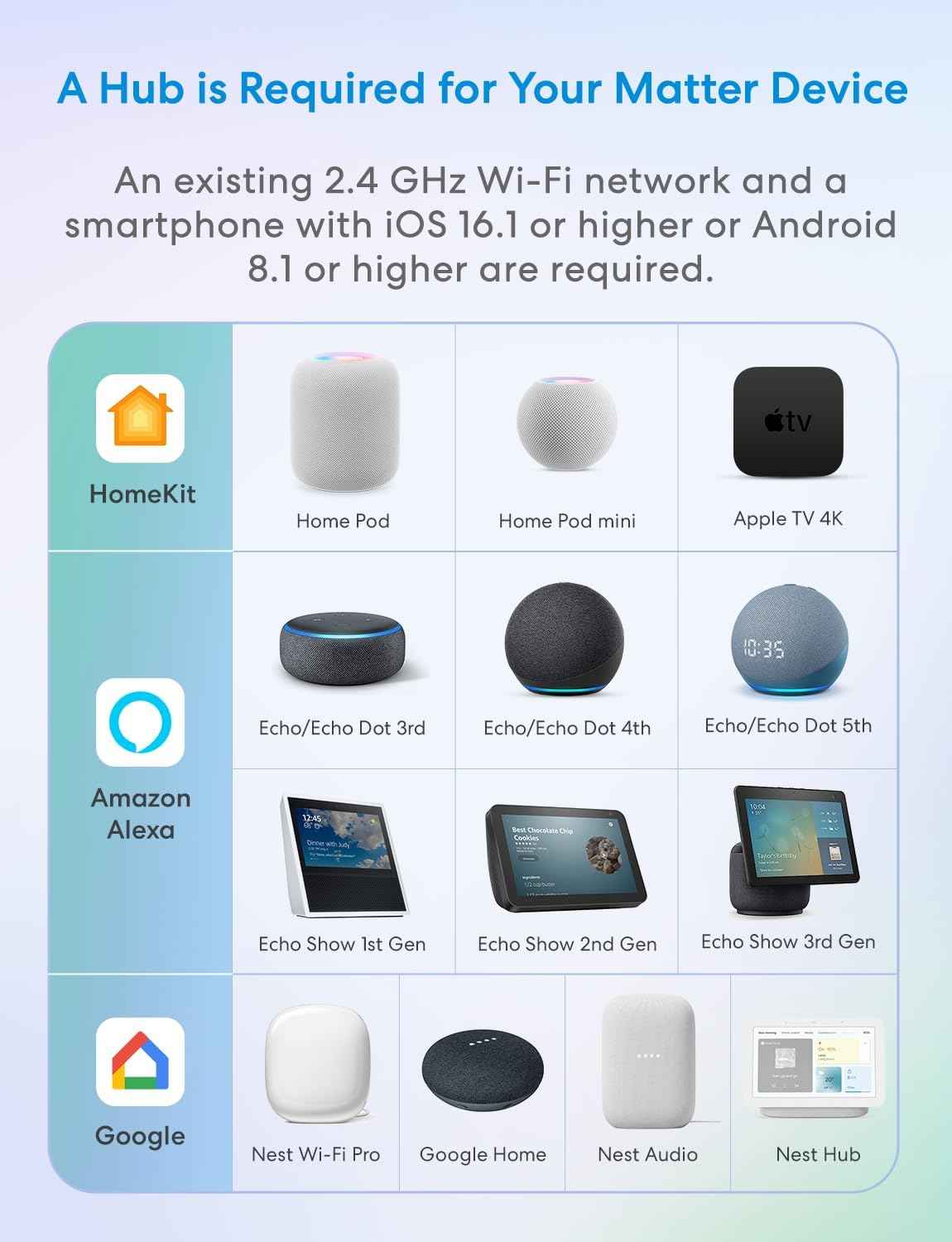
To use the Matter feature for cross-platform control, you need a Matter-compatible hub (such as Apple HomePod / Apple TV 4K, Google Nest Hub, or Amazon Echo, etc.). If you only require basic App control, you can also connect it directly using the native Meross App.
Q3: How does this smart plug help monitor energy consumption?
The Meross MSS315 has a built-in power measurement chip that tracks the voltage, current, and power of connected appliances in real-time, recording data in the App so you can view consumption trends by day, month, or year.
|
Platform Name
|
Multi-Admin Function Name
|
Setup Location
|
|
|
Linked Services
|
Turn on Pairing Mode
|
|
|
Linked Matter Apps & Services
|
Link Apps and Services
|
|
|
Alexa: Other Assistants and Apps
|
Add Another
|


Please refer to the images below to see the specific location for adding platforms.
Apple Home:


Google Home:


Amazon Alexa:


- How to integrate Matter devices with Amazon Alexa, Google Home, Apple Home, Samsung SmartThings, and Meross
How to connect Matter devices with Amazon Alexa?
How to connect Matter devices with Google Home?
I have a Google Pixel phone, how do I set up a Matter device?
How to integrate Matter devices with Apple HomeKit?
How to integrate Matter devices with Samsung SmartThings?
How to use the Meross app to set up Matter devices?
How to connect Matter devices with Amazon Alexa?
1. Open the Alexa app and go to the "Devices" page. Tap the "+" button.


2. Select "Other" from the device type list, then select "Matter".


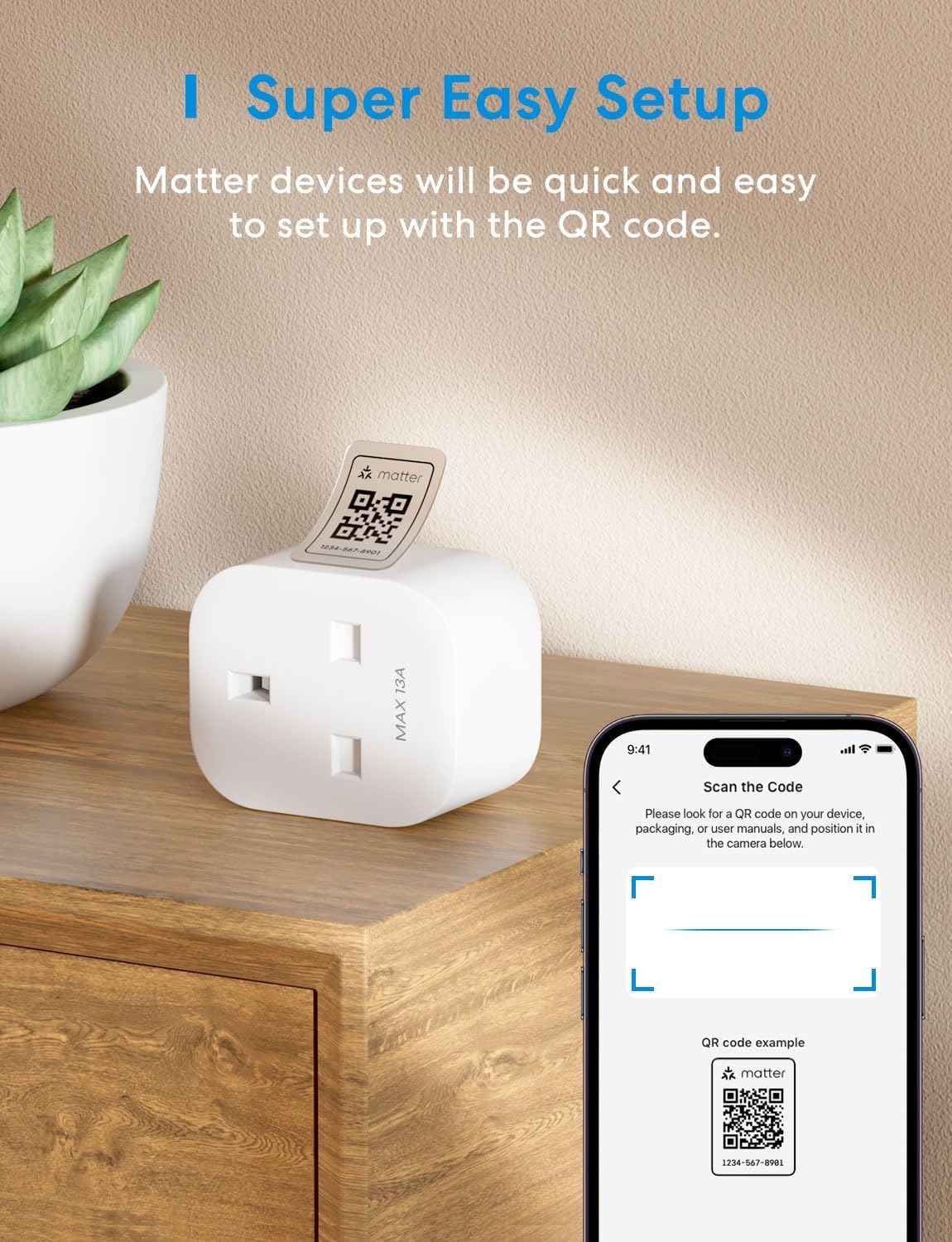
3. Scan the QR code or manually enter the setup code.


4. Your Matter device is now set up and ready to use with Alexa. If you are still experiencing issues, click here to view more solutions.


How to connect Matter devices with Google Home?
1. Open the Google Home app and tap the "+" button on the home screen. Next, select "Set up device".


2. Select "Matter-enabled device", then scan the code or manually enter the code to continue.


3. Agree to add the device to your Google account, ensuring you have a Matter-enabled hub configured.


4. You're all set! If you are still experiencing issues, click here to view more solutions.


I have a Google Pixel phone, how do I set up a Matter device?
Google Pixel phones integrate seamlessly with Matter-enabled devices. When you set up a new Matter device for the first time, your Pixel phone will automatically pop up a pairing request, making it easy for you to connect the device to other ecosystems. If you do not want to receive this prompt, simply tap "Not now".
If you are still experiencing issues, click here to view more solutions.


How to integrate Matter devices with Apple HomeKit?
1. Open the Apple Home app, tap "Add Accessory", scan the Matter code or manually enter the code.


2. Tap "Add to Apple Home". If the problem persists, click here to view more solutions.


How to integrate Matter devices with Samsung SmartThings?
1. Ensure you have set up your SmartThings hub, then tap the "+" icon on the home screen.


2. Scan the QR code.

3. Select your hub to add the Matter device, then tap "Next".


4. For iOS users, the device will be automatically added to iCloud.


5. Add the plug to your SmartThings account. If you are still experiencing issues, click here to view more solutions.


How to use the Meross app to set up Matter devices?
Please first update your Meross app. Then, tap the "+" button on the home screen, select your Matter device, and follow the in-app wizard to complete the setup.
Note:
If you are an iOS user, the Meross app will guide you to first add the device to Apple Home. Afterwards, the device will be automatically added to the Meross app.
Similarly, if you are an Android user, the Meross app will guide you to first add the device to Google Home, and then the device will be automatically added to the Meross app.
Later in 2023, the Meross app will provide various ecosystem options for users to select during the setup process.
If you also wish to add the device to Amazon Alexa, please refer to our Alexa pairing FAQ for instructions.
If you are still experiencing issues, click here to view more solutions.


- General questions about Matter
1. What are the system requirements for Matter devices?
Please refer to the FAQ "System requirements for Matter devices".
2. Do Matter devices need a Home Hub to be set up?
For major platforms like Alexa, Google, Apple, and Samsung, the answer is yes. Setting up Matter devices requires an Alexa Echo, Google Nest Home, Apple HomePod mini, SmartThings Hub, or other smart home hub.
3. How do I set up a Matter device?
Please refer to the FAQ "How to connect Matter devices with Amazon Alexa, Google Home, Apple Home, and Meross".
4. My Matter device won't pair, what should I do?
Please refer to the FAQ "Cannot set up Matter".
5. Can I add a Matter device to the Meross app after pairing it with other platforms?
Yes, please ensure your device and phone are connected to the same WiFi network. Then tap "+" in the Meross app. The device will be discovered on the local network, and you simply need to tap "Add" to automatically add it to your account.
6. If I want to add multiple platforms, how should I proceed?
Please refer to the FAQ "How to add my Matter device to multiple platforms (multi-admin feature)".
7. If I remove my device from one platform, will it still work on other platforms?
This will not affect your use of other platforms. However, if you have already added the device to the Meross app, please do not easily remove it from the Meross app, otherwise, the device will be factory reset, which will affect its use on other platforms.
8. How do I factory reset a Matter device?
Please follow the instructions in the user manual included with your device. To reset the smart plug, hold down the power button for 5 seconds until the LED indicator flashes alternately amber and green. Please note that removing a device from any ecosystem will not factory reset it.
9. How do I know if a product is Matter-compatible?
Matter products typically have the Matter logo printed on the packaging. There will also be a Matter setup code on the product, similar to what is shown below.


10. Where can I find the Matter QR code?
Only devices with the Matter logo are Matter-compatible, which can be identified by the QR code sticker on the device.

11. How do I upgrade the firmware? What steps should I take if the firmware upgrade fails?
Currently, firmware upgrades can only be performed through the Meross app. If you have integrated your device into Apple HomeKit, Google Home, or Alexa, follow these steps (if you have already added the device to the Meross app, skip to step 4):
1) Ensure your phone is connected to the same Wi-Fi network used during device setup.
2) Open the Meross app, then tap the + button on the home screen.
3) Find the device in the local device list, then tap "Add" (see Figure 1).
4) Wait a minute; once you see the device in the Meross app, go to the user page, tap Firmware, and proceed with the upgrade (please see Figure 2).


If the upgrade fails, try the following troubleshooting tips:
1) Restart the Matter device.
2) Restart your router to clear the cache and ensure the internet connection is working properly.
3) Check your router's firewall settings to ensure there are no specific settings blocking the upgrade process.
12. Is your Matter device unresponsive?
1) Ensure the device always maintains a stable Wi-Fi signal connection. If necessary, you can unplug the power cord and plug it back in to restart the device.
2) If the current Wi-Fi channel is congested due to heavy interference or packet loss, please log in to your router and switch to another Wi-Fi channel, such as 1 or 6.
3) Use a dedicated 2.4GHz Wi-Fi network for the device.
4) Restart your smart home hub, such as an Apple HomePod mini, Apple TV, Google Nest Hub, or Alexa Echo Dot. Ensure they are connected to the same 2.4GHz Wi-Fi network as your smart device.
5) Finally, restart your router to clear its cache.


![[3-Pack] Meross|MSS315 Matter Smart Wi-Fi Plug Mini (UK Version)|Energy Monitoring, Cross-Platform Smart Home Control【HK Official Product|1-Year Warranty】](http://otlmall.com/cdn/shop/files/1695102750636_4c23e891.jpg?v=1787373797&width=1445)
![[3-Pack] Meross|MSS315 Matter Smart Wi-Fi Plug Mini (UK Version)|Energy Monitoring, Cross-Platform Smart Home Control【HK Official Product|1-Year Warranty】](http://otlmall.com/cdn/shop/files/1695102787042_6744028b.jpg?v=1787373797&width=1445)
![[3-Pack] Meross|MSS315 Matter Smart Wi-Fi Plug Mini (UK Version)|Energy Monitoring, Cross-Platform Smart Home Control【HK Official Product|1-Year Warranty】](http://otlmall.com/cdn/shop/files/1695102508201_b5af897f.jpg?v=1787373797&width=1445)


「根據香港法律,不得在業務過程中,向未成年人售賣或供應令人醺醉的酒類」
"Under the law of Hong Kong, intoxicating liquor must not be sold or supplied to a minor in the course of business."
- Choosing a selection results in a full page refresh.
- Opens in a new window.